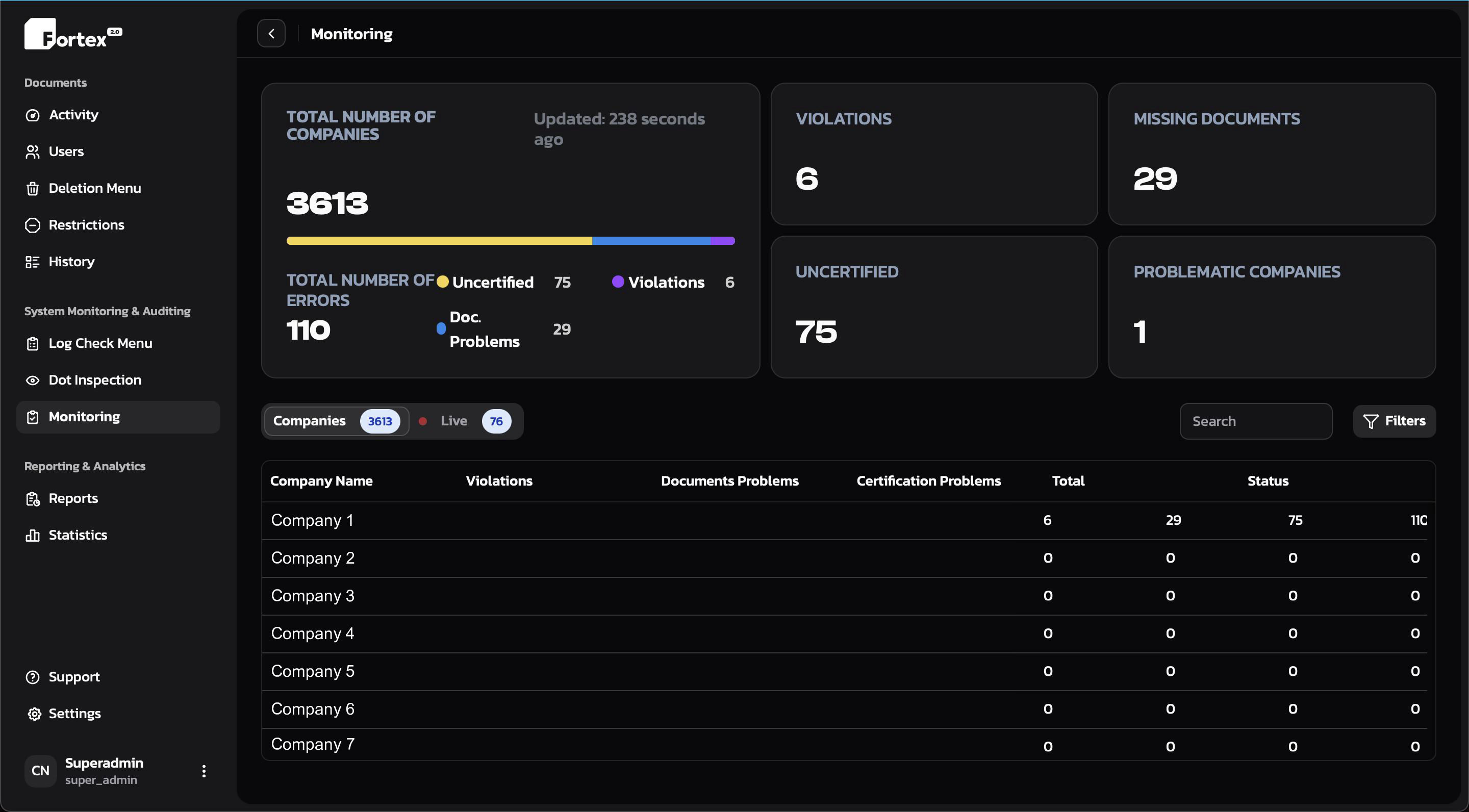
Live error monitoring
Every log in every company is re-scanned continuously. Errors surface the moment they appear, not on the next audit.

Fortex watches every log, on every ELD you run, in real time. The AI finds the errors, names the rule they break, and puts them in front of your team — long before a roadside inspection does.
Most compliance software tells you what went wrong last month. Fortex tells you what is going wrong right now, while there is still time to act on it.
| Company | Violations | Docs | Cert. | Status |
|---|
Every log in every company is re-scanned continuously. Errors surface the moment they appear, not on the next audit.
Upcoming scale houses, hours running out, and forming violations are pushed to dispatch before the driver gets there.
Critical events go straight to the people who act on them — no dashboard babysitting, no missed inbox.
Company, terminal and driver level statistics — DOT inspection readiness, error trends, and logbooker performance.
A logbooker can spot-check a handful of days. The AI re-reads every driver's full duty cycle — events, documents, certifications — and reports exactly what is wrong, which rule it touches, and how urgent it is.
Every log in every company is re-checked as new events arrive — not once a month, and not only on the days somebody thought to open.
Each finding is tied to the specific regulation, the exact events, and the time window — so nobody has to reverse-engineer why it was flagged.
Your team works a ranked list — worst first, by company, terminal or driver — instead of hunting through calendars.
Fortex reads and reports. What happens to a finding stays a decision your compliance team makes.
The chart was rebuilt around how logbookers actually work — a whole week in one view, findings pinned to the days they belong to, and no modal stacks between you and the information you need.
Work the chart directly instead of retyping timestamps into a form. Every duty status on the day is one gesture away.
Move through a driver's whole week without reloading. The timeline follows you, and open findings stay pinned to the days they came from.
Pull up many events, many days, or a whole date range together — and review them side by side instead of one screen at a time.
Fortex is the CRM layer over your ELD — users, permissions, documents, inspections, reporting and support in one system instead of five.
Run HOS247, ApexHOS and others side by side. One CRM, one workflow, whatever hardware the fleet is on.
Granular permissions per role, per company, per terminal — down to which days a logbooker may touch.
Every operator works differently. Tune defaults, shortcuts, and automation thresholds per user.
Generate and send eRODS output files, review inspection reports, and keep the paper trail audit-ready.
BOLs, DVIRs, scale tickets and driver activity in one timeline, tied back to the log they belong to.
Every edit — human or AI — is recorded with who, when, and what changed. Nothing is untraceable.
Track logbooker throughput, error rates and response times. Manage the team, not just the trucks.
Automating the routine scan-and-fix loop is what actually cuts the cost of running a logbook desk.
Real people on Telegram, in your timezone, including nights and weekends.
Dark by default, dense where it needs to be, and fast on the tables that actually matter. Monitoring, log check, DOT inspection, reports and statistics all live one click apart.
No separate module for monitoring, no upcharge for a second company, no per-seat fee for the people working the queue. Connect your existing ELD and the AI starts scanning from day one.
Not a sales queue — the people who work on the product answer directly.